
Questions
How do I undo an agent’s change?
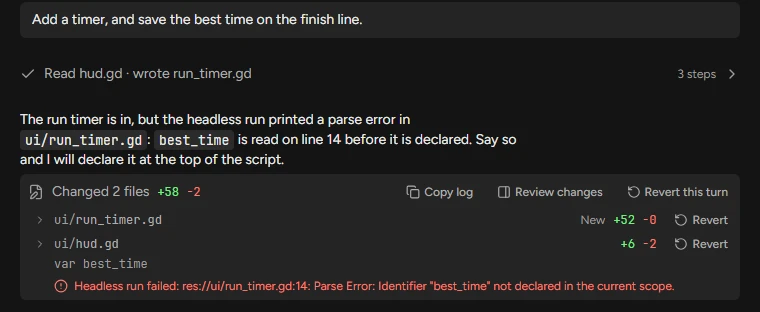
Press Revert this turn on the turn’s receipt, or type /undo for the newest turn. Revert on a file’s row takes back that file, and Review changes (Ctrl+Shift+R) takes back one hunk. Redo puts a reverted turn back.
Revert a turn, a file or a hunk
- Find the receipt under the turn’s reply: "Changed 2 files +58 −2", then a row per file.
- Press Revert this turn to put back every file the turn changed, or Revert on one file’s row.
- For part of a file, press Review changes (Ctrl⌘+Shift+R), then Revert on the hunk. Revert file puts the whole file back.
- Changed your mind: Redo puts the turn’s changes back.
Undo in Godot and in Git
An edit the agent made through the Godot editor is one step of Godot’s undo history, named for what it did, such as "Flockbay: Add Player", so Ctrl⌘+Z in the editor takes it back. Project settings and input actions are written by the app, not the editor, so Ctrl⌘+Z does not take them back: revert the turn instead.
In a Git repository, Version control (Ctrl⌘+Shift+G) lists every uncommitted change on Changes, and History › Restore goes back to an earlier commit.
Reverting takes back files, not the conversation: the agent still remembers making the change. Say what you took back and why, or start a new chat.