
Questions
How do I review what the agent changed?
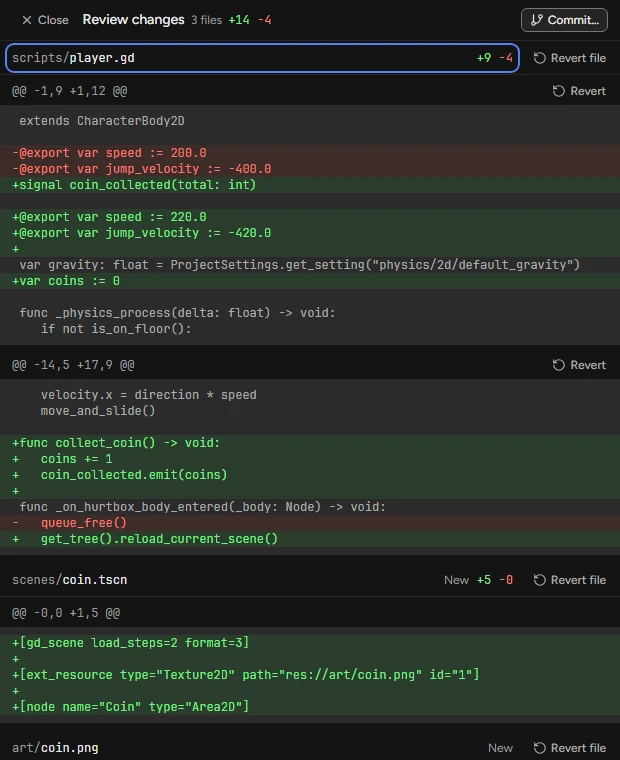
Every turn that changes files ends with a receipt, "Changed 3 files +42 −7", and a row per file with its diff. Review changes (Ctrl+Shift+R) opens every file the turn changed in one scroll, beside the chat.
Review changes
- Press Review changes on the turn’s receipt, or Ctrl⌘+Shift+R.
- Read each file’s hunks; ↑ and ↓ move between files.
- Press Revert on a hunk you do not want, or Revert file for the whole file.
- In a Git repository, Commit… opens Version control with the reply’s first line as the message.
- Close, or Ctrl⌘+\ in Flockbay’s window and Esc in the editor’s dock, goes back to the chat.
While the turn runs
Each tool call is a step row naming what it touched. Open a step for what was sent and what came back: the command with its output and exit code, or the diff of a file. Ctrl⌘+O switches the transcript between Normal, Thinking and Verbose.
A res:// path or an error line opens in your external editor at its line: Settings › Developer › External editor sets which one.