
Questions
How do I commit the agent’s changes to Git?
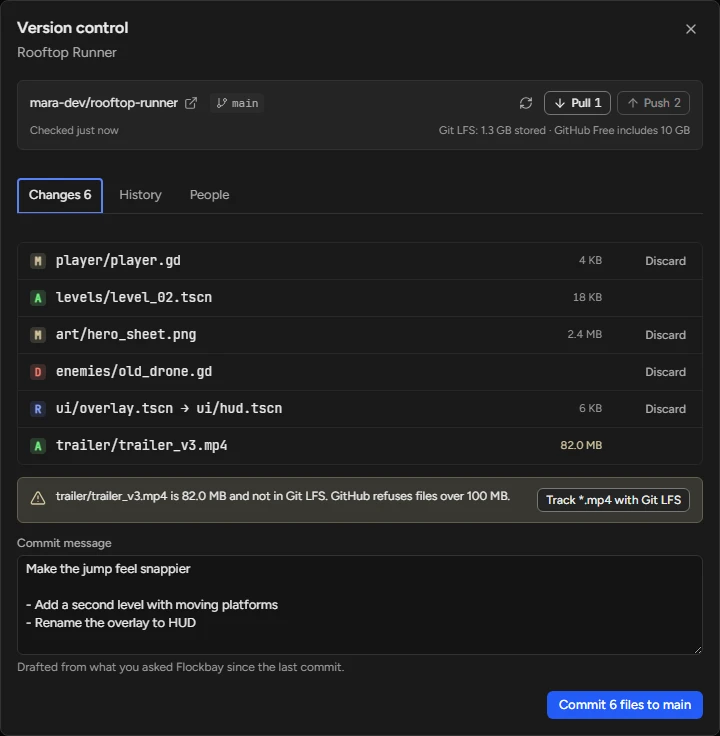
Open Version control (Ctrl+Shift+G). Changes lists every uncommitted file with its diff, the commit message is drafted from what you asked Flockbay since the last commit, and Ctrl+Enter commits. Push and Pull are at the top of the panel.
Commit a turn’s work
- Press Ctrl⌘+Shift+G, or Commit… in Review changes, which opens the panel with the reply’s first line as the message.
- On Changes, open a file for its diff, or Discard one you do not want.
- Edit the drafted message, then press the commit button or Ctrl⌘+Enter.
- Press Push to send the commit to your remote; Pull brings in commits you do not have.
Who commits
You do, by default. In a project made elsewhere the AI commits only when you ask it to, and it never writes a name or an email into your Git config. A game with no repository yet has Set up version control in the game menu, with Git and Git LFS included, and Publish to GitHub follows once GitHub is connected.