
Questions
How do I connect Claude Code to Godot?
Open your Godot project in Flockbay, then Connectors › Connect your agent (MCP) › Set up › Turn on. Pick Claude Code, press Copy, and paste the command in a terminal. In a new Claude Code session, /mcp lists flockbay.
Connect it
- Open the Flockbay app with your game. The project menu at the top of the chat has Connect your agent (MCP)…, and so does Connectors, as Set up on its row.
- Press Turn on. The dialog shows "MCP server flockbay · On · serving" and your game’s name.
- Under Your agent, pick Claude Code, press Copy, and paste the command in a terminal. It registers the server for your user, so every folder you start Claude Code in has it.
- Start a new Claude Code session.
/mcpinside it, orclaude mcp listin a terminal, shows flockbay and whether it connected.
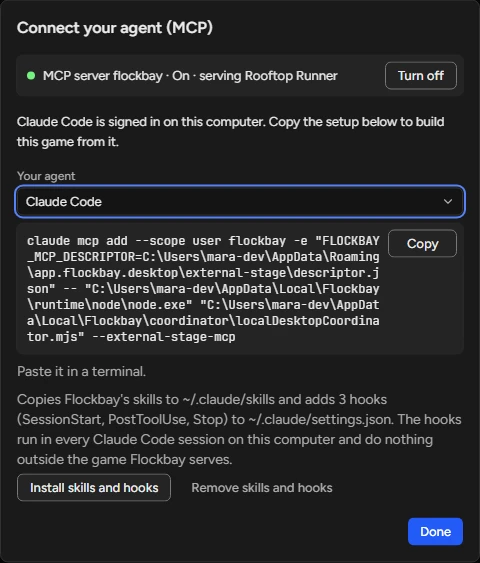
Copy the command from the dialog, not from a web page: it holds the paths to this installation, which can change when the app updates.
Codex and other agents
Codex takes a command too: pick Codex, paste it in a terminal, and codex mcp list shows the server. For Cursor, VS Code, Gemini CLI and the other agents, the dialog shows a config block and the file it goes in. Connecting is free: your agent runs on your own model and subscription.